.png)

Introduction
In many new integration landscapes (using IBM MQ), it is common to start with a simple and pragmatic configuration: a limited number of sender channels and transmission queues (XMITQs) are shared by multiple applications. For moderate and predictable workloads, this default setup often proves to be more than adequate.
However, in real‑world enterprise environments, message traffic rarely remains constant. Load patterns change, applications evolve, and peak volumes become more frequent and less predictable. As an IBM integration consultant, I’ve noticed that often the shared sender channel won’t be able to transport these events/messages fast enough during these evolving traffic spikes. As a result that the number of events/messages start to grow on the shared XMITQ.
When this XMITQ reaches its MAXDEPTH, the applications producing data for these remote queues are unable to send more data until space becomes available again. So, what initially appeared to be a performance issue within one integration, can quickly escalate into a wider impact, causing impact on multiple applications.
This article describes why shared channels and transmission queues increase the risk of performance issues, and how channel and XMITQ segregation can be used as an effective design strategy to ensure predictable throughput and isolate critical integration flows.
How do channels and XMITQ’s work?
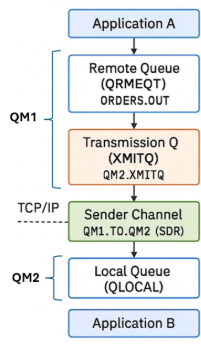
Assume we have two applications working both with a different Q Manager. Application a wants to send data to application B using a remote queue. A remote queue is not a storage location but just metadata with important information concerning the events destination (RNAME, RQMNAME).
The transmission queue is a temporary storage location connected to a sender channel. This channel will be used to send data to a local Q on the remote queue manager (based on the information stored in the metadata). Once the event is stored on the local Q, the receiving application can process the data.
The risk
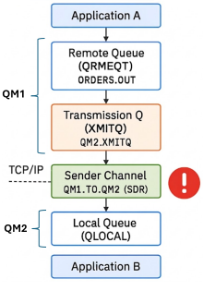
When there is a peak in the traffic and the receiving applications are not capable of processing the incoming events fast enough. The input of events to the destination local Q will be higher than the output. Finally resulting in a full Q.
Once the Q is full, the channel will not able to store more events on the Q, so the events remain on the XMITQ until there is room available. Once the XMITQ is full, the producer won’t be able to produce any more events until there is room available on the XMITQ. In addition, if messages cannot be delivered correctly, they may be routed to the Dead Letter Queue (DLQ). If the DLQ is not properly monitored or also reaches its capacity limits, this can further impact system stability and message flow, potentially leading to message loss or processing delays.
Typical errors are:
- 2053 MQRC_Q_FULL
- 2051 MQRC_Q_NOT_AVAILABLE
Bigger impact
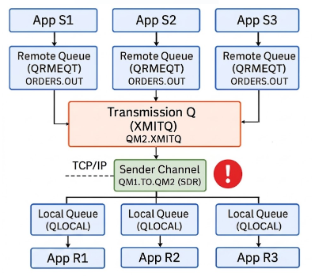
The real impact is where we have multiple applications using the same channel (XMITQ) to transport data from one MQ to a remote MQ. An XMITQ processes events in FIFO order. Meaning, when the first events are blocked due to a full destination Q, the other events (going to different Q’s) will also need to wait until the XMITQ has availability to process next events.
Recognizing the issue
Like already mentioned, typical errors are:
- 2053 MQRC_Q_FULL
- 2051 MQRC_Q_NOT_AVAILABLE
But you can already notice typical symptoms before receiving these errors. These symptoms can be:
- All applications using the same channel are becoming very slow
- CURDEPTH of the XMITQ > 0 and it changes often. Worst case it is full and it remains full for a period of time (but then you are already receiving errors)
- Channel status = RUNNING but lagging
Quick Fix
If you are suffering from this issue and you need a quick fix, you can follow next steps.
⚠️ Remark: this is not best practice and only to be used in case of need
Identify the producer (remote Q) that is producing a very big load of events. Confirm by checking de CURDEPTH on the remote MQ of the receiving Q. If this Q is full → raise the MAXDEPTH
runmqsc QMGR_NAME
ALTER QLOCAL(QUEUE.NAAM) MAXDEPTH(100000)
DISPLAY QLOCAL(QUEUE.NAAM) MAXDEPTH CURDEPTH
You can also raise the MAXDEPTH of the XMITQ. (often needed to process the backlog, slow network, …)
⚠️ Remark: This does not solve the issue, it only delays the problem. You also need to take the disk size into account. By allocating a higher MAXDEPTH, MQ will use more disk space. If the disk space it not available, the machine will become unstable! Additionally, when a queue approaches its maximum depth, performance can degrade significantly, as MQ needs more resources to manage the increased number of messages, which can impact throughput and response times.
Best Practice
A best practice (also recommended by IBM) is to plan your traffic and split it by using multiple sender channels and XMITQ’s to avoid performance impact. There are many different ways to split your traffic and many of them (if not most of them) are probably correct.
Isolation must happen before the channel, not only at the target queues!
You can split up on functional requirements:
- business critical vs non business critical
- Isolate an application with expected high peaks
- …
You can split on technical requirements
- Apps with unpredictable loads
- expected size (this can be interesting as the size of a data has direct impact on the time needed to transfer the data)[
- XS: 1-10KB,
- S: 10-100KB,
- M: 100KB - 1MB,
- L: 1MB-5MB,
- XL: > 5MB ]
