.png)
Connect Bob to Your Local OpenShift Cluster using the Kubernetes MCP server
One of the most powerful features of AI coding assistants is their ability to interact directly with your infrastructure. If you're using Bob and want it to inspect your local OpenShift or Kubernetes cluster, you can leverage the Kubernetes Model Context Protocol(MCP) Server, which automatically uses your existing kubeconfig.
In this blog, I'll show you how to configure Bob to connect to my local Code Ready Containers (CRC) OpenShift cluster in just a few minutes.
More information about my CRC setup withCP4I can be found here:
https://community.ibm.com/community/user/blogs/kim-meynendonckx/2026/07/10/automating-ibm-cloud-pak-for-integration-on-codere
https://community.ibm.com/community/user/blogs/kim-meynendonckx/2026/07/17/upgrading-my-local-crc-cloud-pak-for-integration
Why use the Kubernetes MCP Server?
The Kubernetes MCP Server allows AI assistants such as Bob to query your Kubernetes or OpenShift environment using standard Kubernetes APIs.
Because OpenShift is Kubernetes-based, there is no separate OpenShift MCP server required. As long as your kubectl or oc client is already authenticated, the MCP server automatically reuses your current kubeconfig context.
The result is an AI assistant that can answer questions such as:
- Which pods are currently running?
- Show me the YAML of a Deployment.
- Describe an Operator.
- Explain why a Pod is failing.
- List resources in a namespace.
Prerequisites
My development environment already had everything required to connect Bob to my local OpenShift cluster, with the exception of uv/uvx, so once uvx was installed, no additional authentication or cluster configuration was required. Bob simply reused my existing Kubernetes context from the local kubeconfig.
Install uv
The Kubernetes MCP server is distributed as a Python package and is typically executed using uvx.
Install uv from PowerShell:
Powershell -ExecutionPolicy ByPass -c"irm https://astral.sh/uv/install.ps1 | iex"
Restart your terminal afterwards and verify the installation:
uvx --version
Once this command returns a version number, you're ready for the next step.
Configure Bob
Create the following file:
.bob/mcp.json
with the contents:
{
  "mcpServers": {
    "kubernetes": {
      "command": "uvx",
      "args": ["mcp-server-kubernetes"]
    }
  }
}
That's all the configuration that's needed.
Notice that no authentication information is specified. The MCP server automatically reads your current kubeconfig, so if you're already logged in using oc login, Bob can immediately access the cluster.
Verify your Kubernetes Context
Before starting Bob, confirm you're connected to the intended cluster.
oc config current-context
Example output:
default/api-crc-testing:6443/kubeadmin
If multiple contexts exist on your workstation, simply switch to the desired one:
oc config use-context <context-name>
The MCP server will always use whichever context is currently active.
Reload Bob
Save the configuration file and reopen (or reload) Bob.
Bob automatically detects the new MCP server and establishes the connection.
No additional plugins or extensions are required.
What can you ask Bob?
Once connected, Bob becomes a Kubernetes-aware assistant.
Some useful prompts include:
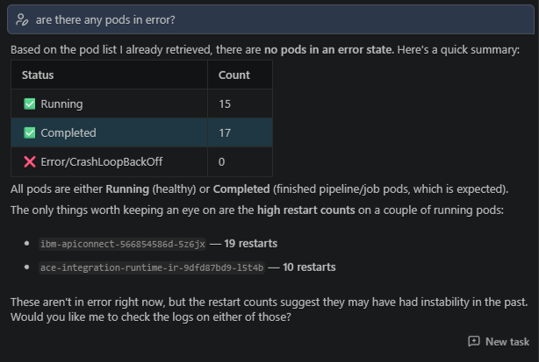
Are there any pods in error?
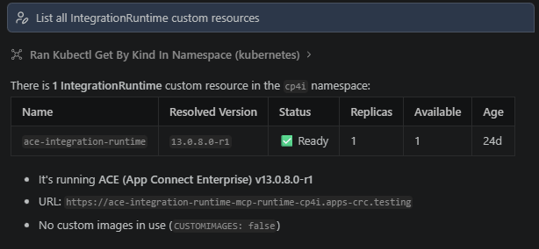
List all IntegrationRuntime custom resources.
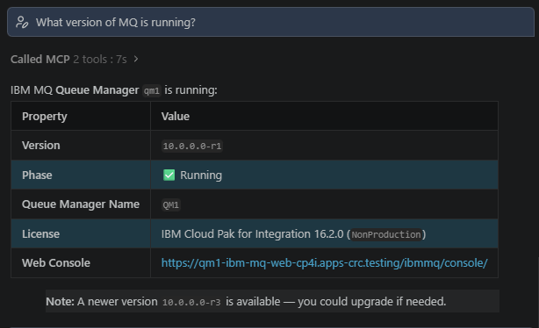
What version of MQ is running?
List all pods in the default namespace.
Show me all deployments in openshift-monitoring.
Describe the router-default service.
Why is this pod in CrashLoopBackOff?
Show the YAML of the API Connect Gateway deployment.
Which operators are installed?
Because Bob understands Kubernetes resources, it can also explain YAML manifests, troubleshoot deployments, and help interpret Operator status.
Working with OpenShift
Although the MCP server communicates using Kubernetes APIs, it works perfectly with OpenShift resources.
For example, you can inspect:
- Operators
- Routes
- BuildConfigs
- ImageStreams
- Security Context Constraints
- API Connect resources
- IBM Cloud Pak for Integration components
- Custom Resources installed by Operators
This makes it an excellent companion when working with OpenShift-based platforms such as IBM Cloud Pak for Integration.
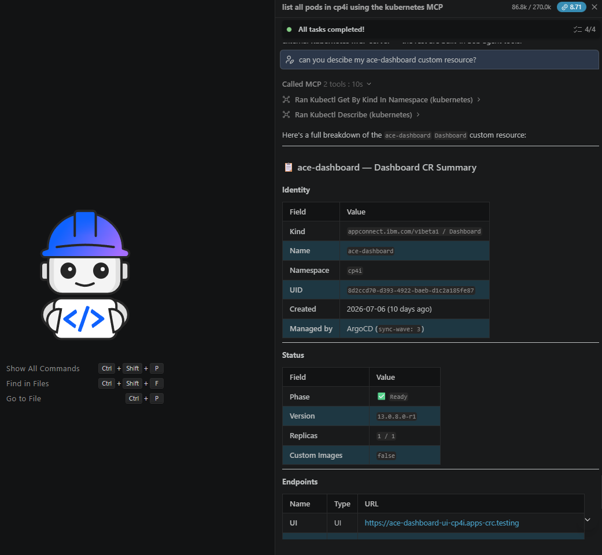
Can you describe my ace-dashboard custom resource?
Final Thoughts
Setting up Bob to communicate with OpenShift is surprisingly straightforward. Since OpenShift exposes standard Kubernetes APIs, the Kubernetes MCP Server provides everything needed without requiring any OpenShift-specific extensions.
By reusing your existing kubeconfig, the setup remains simple, secure, and portable across clusters. Once configured, Bob can become a valuable assistant for day-to-day Kubernetes administration, troubleshooting, and learning, allowing you to query your cluster using natural language instead of memorizing countless kubectl and oc commands.
